 YN Translation Workshop
Your first YN project
中文 · Project · Full settings
YN supports all-AI translation and proofreading, fully manual translation and editing, or a mix chosen for each project. This page describes 2.2.0. Try a small sample before a whole novel or game-text batch.
Choose how to work
- AI translation: prepare settings and source text, then process line-based chunks with mechanical checks, independent review and precise repairs. Chunks can run across parallel agents.
- AI proofreading: bind an existing translation aligned with the source and choose split review or Monte Carlo stratified sampling. Findings provide specific issues and complete replacement suggestions, which can be applied automatically or handled individually.
- Manual or mixed editing: generate aligned source/translation HTML and edit translations yourself. You can optionally ask AI about selected lines, maintain terminology and character records, or send only part of the work to AI.
Download and model
Get the Windows installer or portable build from Releases. Configure the provider, model and authorization at the top of the start page when using AI features. External agents use this same YN configuration.
Create the project
Choose the source and project location. TXT supports files, folders and alternating bilingual lines. EPUB is extracted to working text; PDF requires selectable text. Original inputs remain read-only.
Set the language direction and one project style. Defaults are 500 lines per chunk and up to 3 child agents. Worker counts are concurrency ceilings.
Glossary and characters
If the project already has a glossary, character records or notes, AI can organize them into project references. This workflow can create a project without an existing translation. AI prepares and checks drafts before committing formal assets; drafts can also be edited when needed. Tables can later be viewed, edited and deleted from HTML.
Start translating
The start-page translation shortcut checks settings against the actual source. For requested preservation, the model uses real text samples to propose scoped rule candidates; the program trials the rules and validates their matches before starting translation with the same settings and prompt used by the HTML controls. Translation is split by line and can use parallel agents. Each chunk gets mechanical checks, then independent review covers every mechanically risky row and samples ordinary rows. Failed rows return to the translation agent for precise repair. Existing translations can be audited and selectively reused, and stopped tasks can resume. You can also generate aligned HTML first, adjust settings yourself, and invoke AI selectively.
Preservation rules protect only their actual matched positions; prose outside the matches remains translatable. Custom regex rules and match examples are optional adjustment tools. Explicitly untranslated names can be recorded as confirmed source-to-identical-target terms in the formal glossary.
Existing translations
Bind a translation aligned with the source. Reuse mechanically screens old rows, semantically audits risky ones, then asks for one batch decision. Accepted rows remain; only rows that need translation go back into the queue. Resolve binding or line-count mismatches first.
Proofread and write
Proofreading requires an existing translation aligned with the source. Split review semantically checks every assigned row. Monte Carlo combines full deterministic scans with stratified semantic sampling and does not semantically review every row. Findings identify the row, include supporting evidence and provide a complete replacement suggestion.
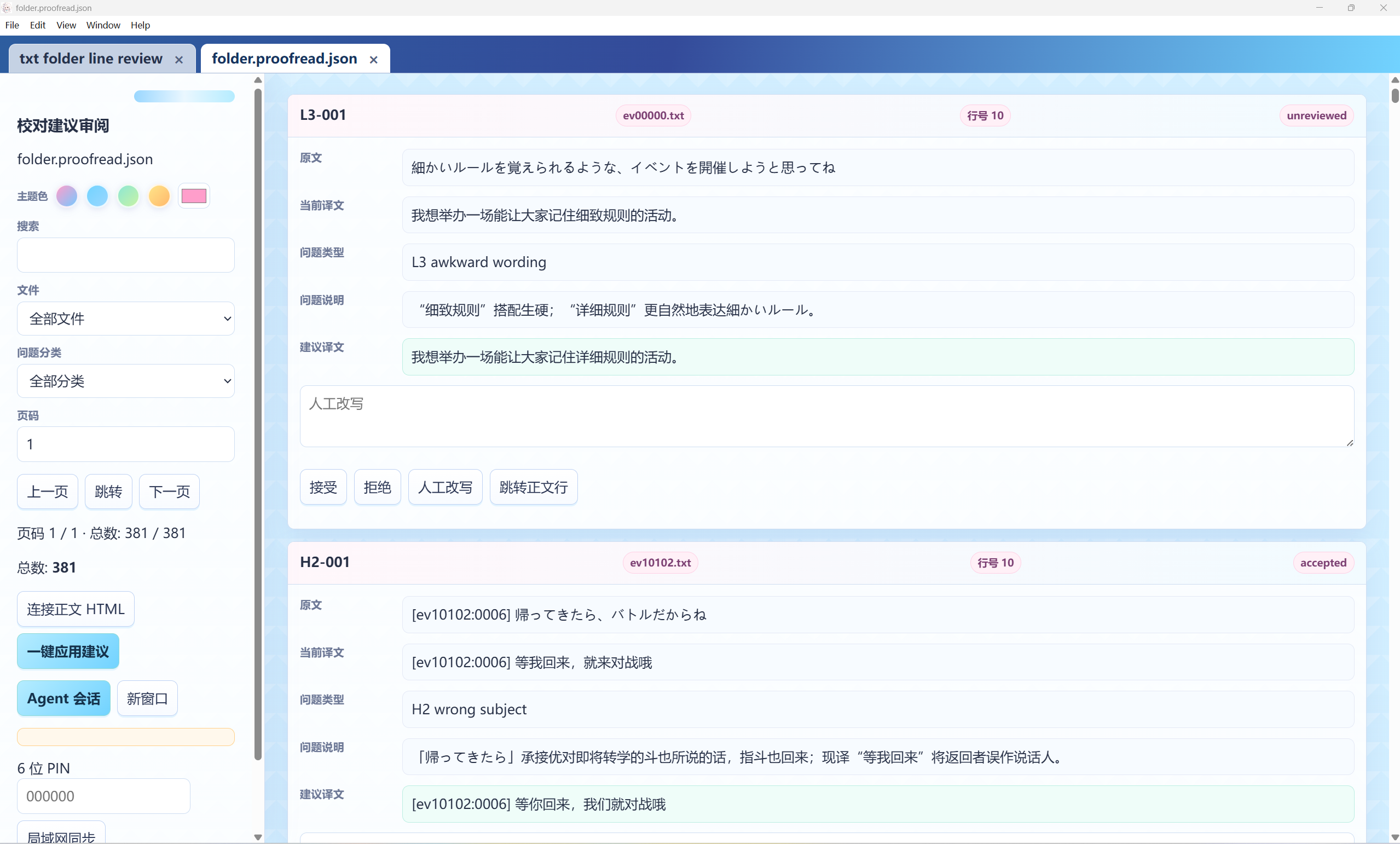
Suggestions can be applied to HTML automatically or accepted, rejected or edited individually. After AI processing or manual editing, use the controls to write the final TXT, batch-write files or export EPUB/PDF. Automatic application updates HTML; the write/export controls save the final file.
PDF, code and formulas
Use text-layer PDFs. YN extracts prose, code/math glyphs and figures, organizes logical structure mechanically, then uses the current model for structure corrections and an independent audit before review HTML is generated. Translate editable prose while code, formulas and references retain source glyphs. Export reconstructs structured HTML from current translations and assets, then reflows it into a new PDF without original prose-box length limits. Opening existing HTML does not rerun structure models. See the PDF guide for supported inputs and asset limits.
Stop and move projects
Stop and wait for cleanup before closing or moving files. Resume verifies drafts and proof before model calls. Restore missing bound files rather than repeatedly asking the model to retry. Internal bindings resolve relative to the project root; transfer and rebind external sources, PDFs and references too.
Phones and LAN
Enable desktop LAN sharing, set a PIN and open the displayed address on the other device. Edit translations, review suggestions and use the same Agent session while desktop YN stays running. Public tunnels are external tools; protect the PIN and address.
External agents in the background
Give Codex or another agent the official Agent API guide. It must show location, model and full settings, wait for user confirmation, then prepare and start. The API is local stdio with a launcher, not a public network service. It uses YN's configured model, not the external agent's chat model.